If you’re reading this, you’re probably frustrated.
Maybe your gate has gone down more than once.
Maybe support takes too long to respond or does not respond at all.
Maybe you feel locked into a system that no longer fits your facility.
And now you’re considering a switch.
You’re wondering how to switch self-storage access control systems without creating bigger problems.
But here is the real concern.
If you switch, will the gate stop working? Will tenants get locked out? Will you lose codes or access history?
Those fears are reasonable.
Access control protects your facility, your tenants, and your reputation. It’s not something you change lightly.
The good news is this. A properly planned transition does not require shutting down your facility. Switching can be controlled and predictable when handled correctly.
This guide explains how.
Why Self Storage Owners Switch Access Control Providers
Most owners do not switch because they want new features.
They switch because something is not working.
Common frustrations include:
- Slow or inconsistent support
- Support that does not respond at all
- Hardware reliability issues
- Integration problems with management software
- Increasing costs without improvement
- Outdated technology that requires manual intervention
- Limited flexibility for multi location operations
Over time, small issues add up. A gate that goes offline on a Sunday. A support ticket that sits unanswered. A tenant calling you upset instead of the vendor calling to help.
Many facilities that transition to SpiderDoor have already tried other systems. They are not looking for hype. They want reliability and responsiveness.
Signs It Is Time to Replace Your Access Control Provider
You do not need a catastrophic failure to justify change.
It may look like this:
- You hesitate to call support because it feels difficult
- Gate outages have happened more than once
- Tenants mention access problems
- You are manually correcting system errors
If you are actively searching how to switch self storage access control systems, that usually means the decision process has already started.

Can You Switch Without Shutting Down Your Facility?
Yes.
But only if the transition is staged.
Downtime usually happens when someone attempts a full replacement in a single step. Turning off the old system before the new one is fully tested creates risk.
A controlled transition keeps the existing system active while the new one is installed and configured.
Nothing gets shut off until you’re ready.
Some facilities also use this time to evaluate whether a cellular or hardwired system is the better fit for their infrastructure.

What Happens to Tenant Codes and Data?
This is one of the most common concerns.
SpiderDoor does not migrate data from your old access control system.
Instead, we connect directly to your management software.
Your management software remains the source of truth.
Once connected:
- Active tenants sync automatically
- Access permissions sync automatically
- Lockout statuses sync automatically
- Gate permissions update in real time
There is no manual rebuilding of accounts.
There is no transferring codes from one access control system to another.
The system simply connects and syncs.
From the tenant perspective, access continues based on their status in your management software.
That simplicity is intentional.
How Transitions Are Structured Without Disrupting Access
Full parallel operation of two access control systems is not possible because your management software can only control one access control integration at a time.
Instead of replacing everything at once, transitions are staged by gate or keypad location.
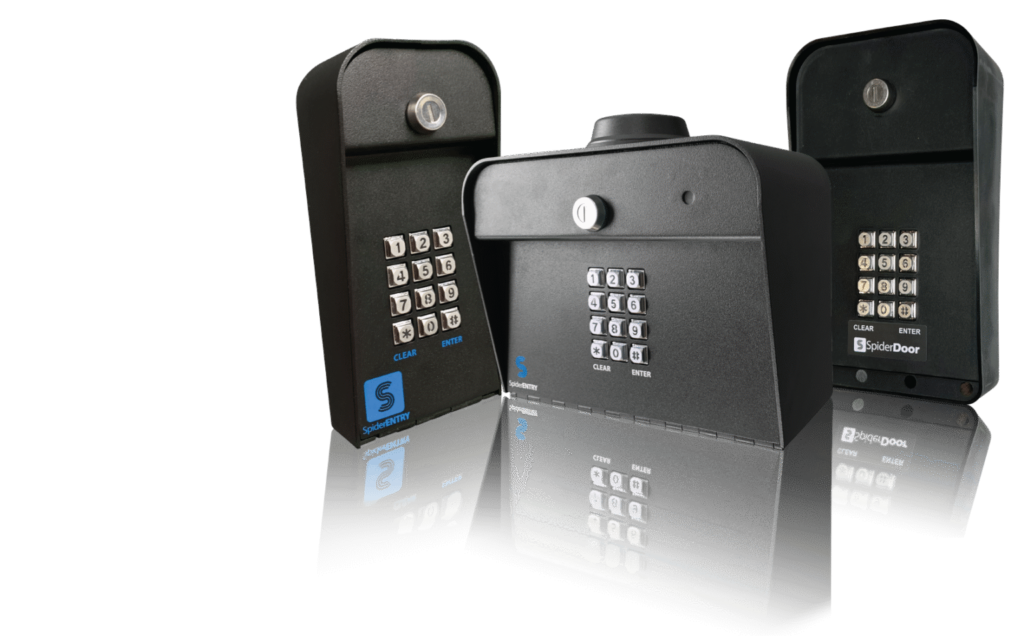
Existing keypads remain active while new keypads are installed in planned phases.
As new keypads are brought online, they are connected to your management software and tested individually.
During each phase:
- Keypads are installed and configured
- Management software connection is verified
- Active tenant access is confirmed
- Gate responses are tested
- Lockout syncing is validated
Only after a location is fully tested does the transition move to the next gate or entry point.
You are not shutting down the entire facility.
You are transitioning in a controlled sequence.
That structured approach is what minimizes risk and prevents facility-wide disruption.
How Long Does It Really Take?
Every facility is different.
The timeline depends on:
- Number of gates
- Hardwired or cellular setup
- Existing wiring condition
- Management software configuration
- Staff coordination
What matters more than the exact number of days is the structure of the process.
A responsible transition includes:
- Reviewing your current setup
- Planning installation
- Scheduling phased keypad activation
- Verifying access before final transition
When structured properly, the process is controlled and predictable.
It should feel organized, not chaotic.
Rushed replacements without planning are where problems usually occur.

What to Tell Tenants and What Not To
Communication should be calm and simple.
Avoid language that creates anxiety.
Instead of saying, “We are changing systems and things might not work,”
Say, “We are upgrading our access control system to improve reliability and security.”
Most tenants will not notice the transition if it is handled correctly. Clear communication maintains confidence.
Mistakes That Cause Downtime
Switching systems is not inherently risky. Poor execution is.
Common mistakes include:
- Turning off the old system too early
- Poor coordination between vendor and facility staff
- Failing to review existing wiring or infrastructure
- Choosing a provider without real migration experience
Downtime comes from rushing, not from switching.
How SpiderDoor Handles System Transitions
At SpiderDoor, transitions are designed to minimize or eliminate downtime during migration.
In many cases, existing conduit and wiring can be reused. Final installation requirements depend on your current infrastructure and should be reviewed with a qualified installer.
SpiderDoor works with you to plan and execute a structured transition from your current access control system to SpiderDoor.
We only ship the keypads once they are successfully syncing with your management software.
Many of our customers mention the same thing in their reviews. They appreciate that calls are answered promptly and issues are resolved quickly. That responsiveness matters during a system transition.
Switching sounds dramatic. When planned correctly, it’s structured and manageable.
Frequently Asked Questions
Will my tenants notice the switch?
If the transition is staged and tested properly, most tenants will not notice anything beyond improved reliability.
What if something goes wrong during migration?
Our Support Team is available to work through any issues to ensure your access ccontrol system is up and running quickly.
Can I switch mid contract with my current provider?
Contract terms vary. Many owners find they have more flexibility than they initially assumed. Reviewing your agreement carefully is a good first step.
How much does it cost to switch systems?
Costs vary by facility size and setup. But staying with an unreliable system has a cost too. Downtime. Tenant complaints. Your time dealing with both.
Switching access control providers does not have to mean chaos.
It does not have to mean downtime.
And it does not have to put your tenants at risk.
You do not have to figure it out alone.
If you’re considering a switch, we can review your setup and walk through exactly what a transition would look like for your facility so you can decide with clarity and confidence.