Upgrading an access control system isn’t just about replacing old hardware. It’s about choosing technology that supports how your self-storage facility operates day to day. The right system can improve security, reduce operational stress, and make life easier for both staff and tenants.
Whether you’re replacing a legacy system or expanding to new sites, these steps can help you choose a solution that fits your operations today — and grows with you tomorrow.

#1 Figure Out If It’s Time To Upgrade
Is your access control system helping or holding your business back? While access control hardware is built to last, there are four key signs it might be time for a modern upgrade. From persistent breakdowns to outdated tech that can’t integrate with your current systems, the following pain points may indicate that your gate controller is no longer doing its job or putting your property at risk.
Recognizing these signs early gives you the time to research, budget, and plan for a smoother transition.
Frequent System Breakdowns
How often does maintenance need to come out and fix your current access control system? When an access control system is offline, it’s not just a maintenance headache, it makes your self-storage facility less secure.
Increases in Security Breaches
Of course, a real sign that it’s time to upgrade your access control system is when you discover you’re experiencing more break-ins or simply more unauthorized persons on the property. Even if incidents are rare, just one breach can damage your reputation and lose tenant trust.
Limited Integration Ability
Your access control system should work with your other security measures, such as entry/exit logs, visitor management, and security cameras. If you’re working with old tech–that works in a silo from the rest of your security–you may be leaving your facility open to security gaps. Integration isn’t just convenient, it’s part of a layered, modern security strategy.
No Remote Access Management
If your access control system is built on outdated technology, it can limit how effectively you manage your facility. Systems that don’t allow you to update tenant access, lock out delinquent accounts, change gate codes remotely, or receive ongoing vendor support can create unnecessary risk and operational friction. Modern access control systems are designed to be managed remotely, giving you more control without requiring constant on-site involvement.
Know What to Look For
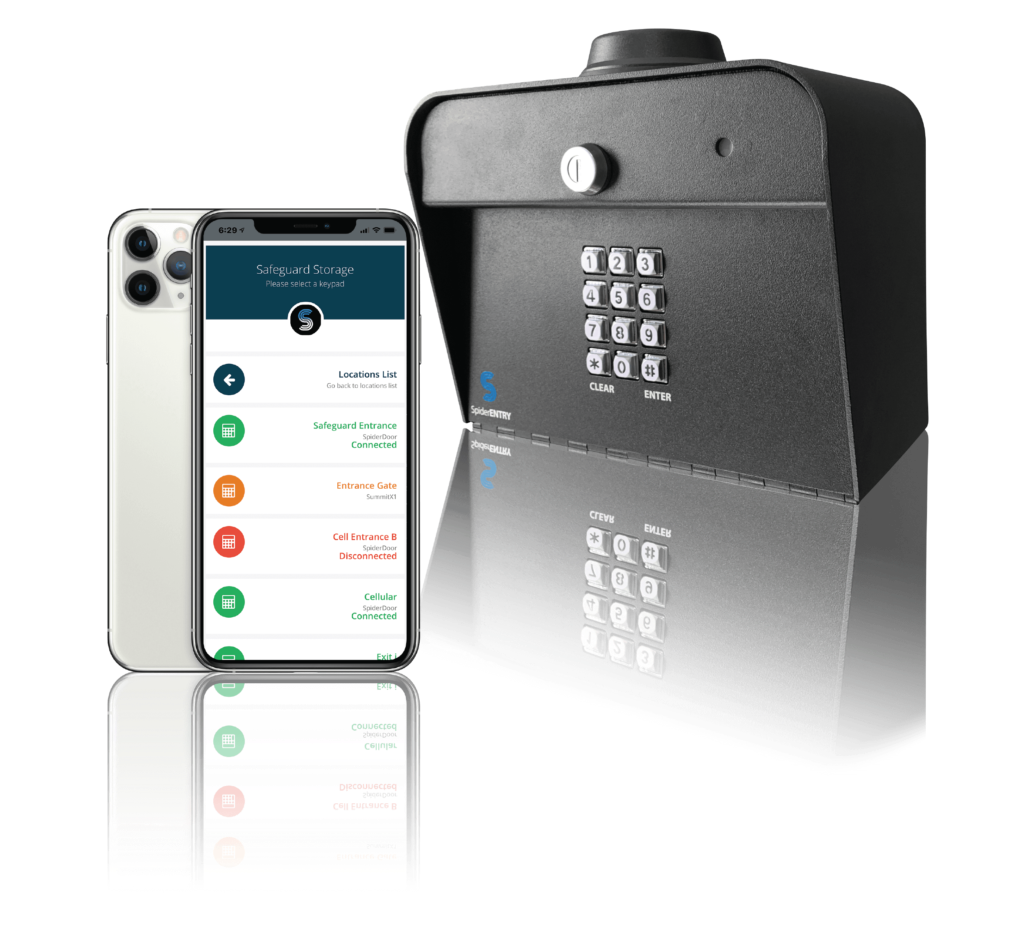
Many systems claim modern features, but not all are designed specifically for self-storage operations. While core capabilities may look similar on the surface, the real differences show up in how systems handle critical functions like SpiderDoor’s self-storage gate control access and how seamlessly they fit into day-to-day facility management alongside your existing technology. Choosing a solution built for self-storage can improve tenant experience, reduce operational load, and help future-proof your property.
Here are some of the most popular features to look for when upgrading your access control system.
- Mobile App Access: Enables tenants to open gates or doors directly from their smartphones, reducing the need for PIN codes or physical remotes.
- Individual Door Alarms: Alerts you to unauthorized activity by monitoring when specific units are opened outside of approved times or access rules either by detecting unauthorized access to the door or by detecting movement within the storage unit itself.
- Remote Management: Gives you the ability to respond to access requests and manage gates and access points remotely.
- Cloud-Based Activity Logs: Automatically records all access events in real time and stores them in the cloud for easy review and auditing.
- Integration With Management Software: Syncs with your self-storage business tools to automate tasks like locking out delinquent tenants or granting access on move-in.
- Touchless Entry Options: Lets tenants use cellular-based mobile access from their iPhone to enter the facility without physically touching keypads or doors.
- Custom Access Schedules: Allows you to set specific hours or permissions for different user groups, such as staff vs. customers.

#3 Make An Access Control Upgrade Plan
Upgrading your access control system is more than swapping out hardware — it’s a coordinated process that involves your people, your property, and your technology. A solid upgrade plan ensures a smoother rollout, fewer surprises, and better long-term performance.
Assess Your Needs
Evaluate current pain points and talk to stakeholders, such as on-site staff and tenants, about what works, what doesn’t, and what improvements they’d like to see.
…And Your Wish List
It’s easy to get starstruck by modern access features. Keep a list of the must-haves for your business today, but also make notes about the nice-to-haves. They might just tip the scale between two options.
Identify Hardware Requirements
Take inventory of your current gates, wiring, keypads, and other security devices. Map your facility and mark where you want access points, cameras, motion detectors, and unit alarms.
And Hardware Limitations
Make sure you understand the technical and budget requirements of the system you’re considering. Some may require a cellular connection, while others rely on wired internet or need extra gateways based on your facility’s size. Accounting for these requirements early helps you plan realistically and avoid unexpected costs during installation or future expansion.
Evaluate Existing Software Capabilities
You don’t need to replace your management software to upgrade your access control. Look for access systems that integrate with your current tech stack to keep your operations streamlined.
Make A Timeline
Align everyone involved — from decision-makers and contractors to staff and tenants — with a clear rollout schedule. A shared timeline helps you coordinate install dates, training, and tenant communications.
Ready to Upgrade?
If you’re starting to notice signs that your access control system is slowing you down, it may be time to look at a solution designed specifically for how self-storage facilities actually operate. SpiderDoor is a modern access control platform built for self-storage, with features like mobile app access, automated gate logs, and remote management tools that reduce day-to-day friction for both staff and tenants.
SpiderDoor is designed to work with the systems you already rely on, including SiteLink, storEDGE, and many others, so upgrading doesn’t mean starting over. Whether you manage a single facility or multiple locations, SpiderDoor helps you modernize access control without unnecessary disruption, giving you more control today and flexibility to grow tomorrow.