Most boat and RV storage facilities already run with minimal staff. Tenant access patterns make traditional staffed-hours operations a poor fit — owners come at sunrise before a fishing trip, return Sunday night, drop off an RV before a weekday business trip. Trying to staff for that schedule doesn’t work, and it doesn’t need to.
This post covers how to actually run a B&RV facility remotely: the technology stack, the operational workflows that replace on-site staff, the realistic limits of remote operation, and how to scale to multiple sites without scaling headcount. It assumes you already own a facility or are past the business-plan stage. If you’re earlier than that, start with our guide on how to build a boat and RV storage business in 8 steps.
Why Boat and RV Storage Is Built for Remote Operation
Three structural facts about this asset class make it different from traditional self-storage, and all three favor remote operation.
Low transaction volume, high unit value. A B&RV facility handles a fraction of the daily transactions of a comparable self-storage facility. Tenants don’t drop in to grab a box from their unit. They come, they hook up, they leave. Less foot traffic means less demand for an on-site office, and the per-unit revenue justifies investment in technology that keeps the facility secure and accessible without one.
Rural and semi-rural locations on large parcels. Most B&RV facilities sit on multi-acre sites outside city limits, often where wired internet to the gate is impractical or expensive. Running fiber across a multi-acre site to connect a single keypad is a bad use of capital. Cellular access control eliminates the problem entirely.
Off-hour access patterns. B&RV tenants want their vehicles before sunrise on weekends and after dark on weekdays. They expect 24/7 access — not as a premium feature, but as the baseline. A facility that can only be accessed during staffed hours will lose tenants to one that can’t.
The same principles apply broadly across the storage industry — see our self-storage remote management guide — but the operational specifics for B&RV are different enough to warrant their own playbook.
The Core Tech Stack for an Unmanned B&RV Facility
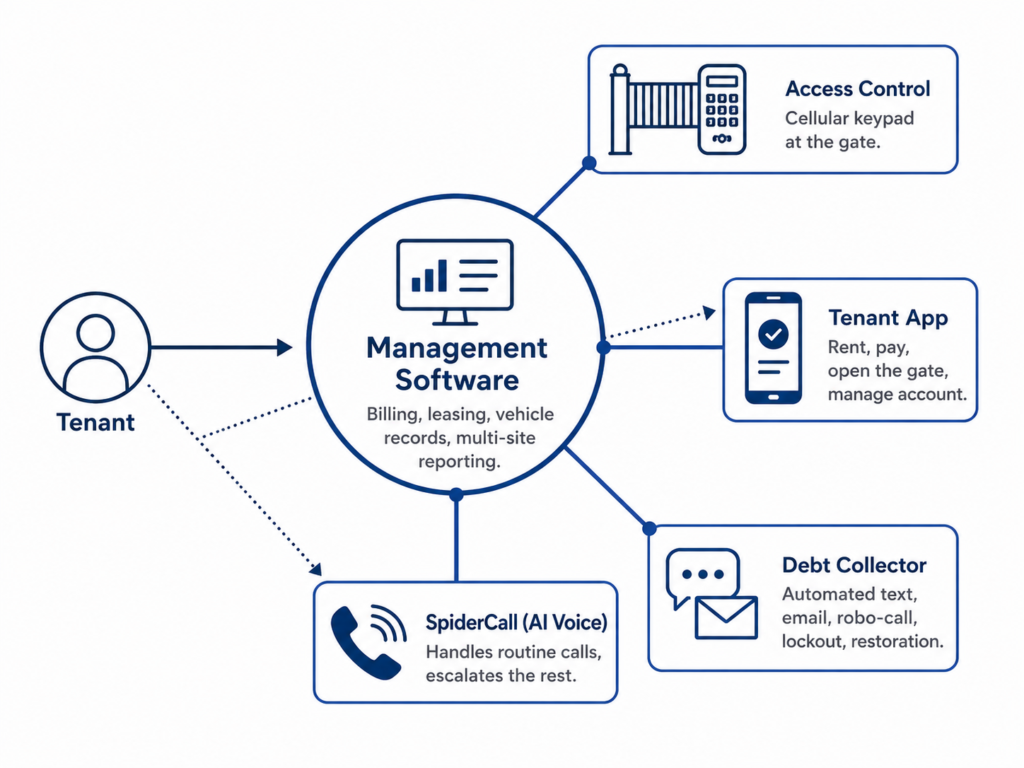
Five components, working together. Each handles a category of work that would otherwise require staff.
Cloud-based management software. The operational backbone. Handles billing, leasing, tenant communications, multi-site reporting, and vehicle records. For B&RV specifically, the software needs fields for make, model, length, registration, and VIN — not just unit numbers.
This is where SpiderDoor’s integration breadth matters. Most access control vendors integrate with two or three management software platforms — usually the largest ones. SpiderDoor integrates with the broadest set in the industry, including SiteLink, storEDGE, Syrasoft, Storage Commander,, Storeganise, Web Self Storage (U-Haul), DoorSwap, and CC Storage and more. If you’re already running a platform, there’s a high chance SpiderDoor already talks to it. If you’re picking one, you’re not locked into your access control vendor’s short list.
Integrated access control. The system that opens the gate, controlled by the management software’s tenant data. When someone rents online, their gate code provisions automatically. When their account goes delinquent, access is restricted. When they pay, access is restored. This is the layer that makes the rest of the stack work, without it you’re back to manually managing codes.
For smaller facilities, SpiderDoor can also run standalone without management software integration. The trade-off is that you’ll handle code provisioning and delinquency manually. For a single-site operator with a handful of units, that can be the right call. For most B&RV operators, the integrated workflow saves enough time that the management software pays for itself.
Worth noting how SpiderDoor handles this differently from most legacy systems: there’s no separate office computer to install software on, no controller box mounted in a back room, no on-site IT setup. The keypad connects directly to SpiderDoor’s cloud, and you manage everything through a browser or mobile app from anywhere. For a remote operator, that’s the difference between a system you can actually run from another city and one that ties you to a specific machine.
Tenant mobile app. Lets tenants do everything they’d otherwise call you for: rent a unit, sign the lease, pay their bill (note this feature is only available with some management software integrations), open the gate, update vehicle info, request a forgotten gate code, and report and issue on site.. SpiderDoor’s tenant app is available for iPhone and Android and can be custom-branded with your facility’s logo. SpiderDoor processes over $7 million in tenant payments through these apps every month — payments push directly to your management software with no intermediate step.
Automated delinquency management. Scheduled reminders, automated gate lockout at the date you specify, and automatic restoration when the tenant pays. SpiderDoor’s Debt Collector runs this end to end, while Gate Collector reinforces it at the point of entry, denying gate access to delinquent tenants, prompting a payment link via text, and instantly restoring access once the balance is cleared.
Inbound call handling. Calls still come in, even at fully unmanned facilities. Options range from an AI voice assistant (SpiderCall is SpiderDoor’s) to a traditional answering service to your own cell phone. The right choice depends on call volume and how much you want to handle yourself.
These five components need to talk to each other. A management software that doesn’t integrate with your access control means manual code entry every time someone rents. An access control system that doesn’t sync with delinquency status means you’re chasing payments by hand. The integrations are what make the difference between “remote management” and running around with five separate apps open.
Access Control for Boat and RV Storage: What’s Different
This is where B&RV diverges hardest from traditional self-storage. Three operational realities shape the right access control choice. (For a deeper comparison of the two connectivity options, see our post on internet vs. cellular gate access control.)
Connectivity at rural sites. Most access control vendors treat cellular as a bolt-on to an internet-first system. SpiderDoor was built cellular-first. The S23c is a cellular keypad with a metal enclosure built for outdoor gate use — designed from the ground up to operate over a cellular signal with no on-site internet. The S33c is a hybrid that runs on cellular but can use internet as backup if you have it on-site. The practical difference for a rural B&RV operator: the keypad works the day it’s installed, regardless of whether anyone has run an internet line to the gate.
One SpiderDoor customer put it directly:
“I absolutely love the cellular pads. They can be used in rural areas that do not offer internet services. I also use their app and texting services. Collections of on time payments have improved.” — Kevin B Wells, SpiderDoor customer
Multiple gates across a large parcel. A five-acre site often has more than one access point. Running power and conduit between gates is expensive and disruptive. Cellular keypads with their own 110V connection at each gate eliminate the need to trench between them — each keypad operates independently and reports back to the same cloud dashboard. Solar-powered keypads, currently in development at SpiderDoor, will further reduce the infrastructure required at each gate.
Keypad reachability from a vehicle cab. A keypad mounted at standard height for someone walking up is wrong for an RV driver. They’re sitting several feet above the ground, often pulling a long trailer they don’t want to climb out of. SpiderDoor’s keypads can be mounted at standard or raised height, and facilities serving both vehicles and walk-ups should plan for both. For facilities that don’t want to install multiple keypads at the same entry point, the tenant mobile app is an alternative. Tenants open the gate from their phone instead of reaching for a keypad, which works regardless of whether they’re in an RV cab, a sedan, or on foot. GPS geofencing keeps the feature secure: it only works when the tenant is physically at the facility.
Automating the Delinquency Workflow
Late payments are the most repetitive work in any storage operation. Done manually, they consume more management hours than anything else. Done automatically, they run themselves.
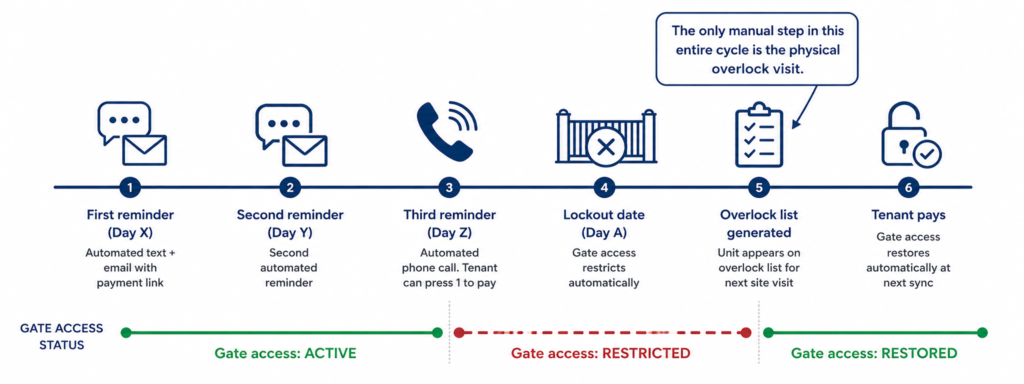
The workflow looks like this:
First reminder (date you choose): Text and email sent automatically. Both contain a one-click payment link.
Second reminder (date you choose): Same channels, slightly firmer language.
Third reminder (date you choose): Automated phone call. The tenant can press 1 to pay over the phone using their card on file.
Lockout date (date you choose): Gate access restricts automatically. Tenant tries the keypad, gets denied, receives an automatic text with a payment link.
Whenever the tenant pays: Gate access restores at the next system sync. No staff action required.
You set the dates. You write the message templates or use the defaults. After that, the workflow runs for every late tenant, every month. SpiderDoor’s Debt Collector handles all of it: text, email, robo-call, gate denial, and automatic restoration on payment. For more on the collections side, see our post on self-storage collection software.
Tenant Self-Service: What Tenants Can Do Without Calling You
The tenant app handles the work that would otherwise come into your phone. SpiderDoor’s tenant app covers:
- Renting a unit and signing the lease entirely online (Sitelink and Storedge only)
- Paying the monthly bill, including setting up autopay (available with most major management software integrations)
- Opening the gate from a phone, no keypad code needed
- Updating vehicle information (new boat, different RV, new registration)
- Requesting a forgotten gate code without calling
- Reporting issues at the facility
The gate-open feature uses GPS geofencing — it only works when the tenant is physically at the facility, near the keypad. This addresses the obvious concern about remote gate access being misused; the tenant has to be on-site for the app to do anything.
The point isn’t that every tenant will use every feature. It’s that the tenants who would otherwise call you with these requests don’t. For a facility owner running operations from another city or another job, that’s the difference between several interruptions a day and zero.
Inbound Call Handling: The Options
Some calls still come in. Forgotten codes, billing questions, prospective tenants, the occasional complaint. The question is who handles them.
| Option | Best for | Trade-offs |
| AI voice assistant (SpiderCall) | Facilities with steady but moderate call volume | Handles routine questions; escalates the rest. Available 24/7. Monthly cost, no per-call charge. |
| Traditional answering service | Owners who want a human voice on every call | Higher per-call cost. Service quality varies. Reps don’t know your facility’s specifics unless trained. |
| Owner cell phone | Single-facility owners with low call volume | No cost, but interrupts your day. Doesn’t scale beyond one or two facilities. |
SpiderCall handles the calls that don’t need a human — gate code requests, payment questions, hours and access information, basic facility details — and routes the ones that do (genuine complaints, complex issues) to you.
A traditional answering service can work, but B&RV calls often involve facility-specific details (which gate, which row, vehicle dimensions) that a generic call center won’t know. If you go that route, expect to write detailed scripts and spend time onboarding the service.
The cell phone option is honest: if you’re running one facility with low call volume, it’s fine. But it caps your ability to add a second facility without changing how you handle calls. And when something does need a human — a real escalation, a complicated billing question — you want to talk to someone who actually knows your account. SpiderDoor’s support team is US-based and reachable by phone Monday through Friday during business hours.
What Remote Operation Does Not Solve
This is where most “run your facility from your couch” pitches go wrong. Remote operation handles the recurring administrative work — billing, access, communications, delinquency. It doesn’t replace physical presence entirely.
You still need to be on-site (or have someone who can be) for:
- Periodic site walks. Visual inspection of fences, gates, lighting, drainage, and tenant compliance.
- Maintenance and repairs. Fence damage, gate motor issues, lighting outages, paving repairs, weed control. Plan for either a part-time on-site person or a relationship with a local handyman.
- Snow removal and seasonal work. Self-explanatory if you’re in a snow market.
- Emergencies. Theft, vandalism, vehicle damage, weather events. The system can alert you; the response still requires presence.
- Insurance claims and incident response. Photos, reports, follow-up with insurers and tenants.
The right framing isn’t “fully unmanned.” It’s “minimally staffed” — the recurring work runs itself, and human presence is reserved for the things that genuinely need a human.
Running Multiple B&RV Sites Remotely
Multi-site operation is where remote management actually pays off. The same automated workflows that save time at one facility save proportionally more time across three or five.
The technology requirements change at scale. Single-site tools that have been duct-taped together for multi-site use will fail. Look for:
Native multi-site management software. Built from the ground up to handle multiple facilities under one account, with dashboards that aggregate across sites and reports that break out by location. Most major platforms (SiteLink, storEDGE, Storage Commander) handle this well.
Multi-site access control. A single login that controls gates at every facility. SpiderDoor’s manager app handles this — open or lock any gate at any facility from one screen, view activity logs across all sites, manage codes from anywhere.
Consistent workflows across locations. The delinquency cadence at Facility A should match Facility B. Same reminder schedule, same lockout dates, same message templates. Inconsistency creates exceptions, and exceptions are what eat your time.
A staffing model that scales. Many multi-site B&RV operators run with part-time roving managers covering multiple sites, plus the owner handling escalations and decisions. The roving manager does site walks, responds to emergencies, and coordinates repairs. The owner handles the rest from anywhere.
The structural advantage of B&RV multi-site operation is that the off-hour access patterns and low transaction volume mean you don’t need a manager at every site. One person can credibly cover multiple facilities — something that would be impossible at the equivalent number of traditional self-storage locations.
Why Operators Pick SpiderDoor for B&RV
A B&RV facility is a long-term capital investment. The access control system you choose is going to run for years, and switching is painful. A few things SpiderDoor does differently that matter for this asset class:
- Month-to-month contracts. No multi-year lock-in. If SpiderDoor stops working for you, you can leave. Most operators don’t, but the option matters.
- 1-year warranty on keypad systems. Real warranty, not a 90-day “limited” one.
- US-based phone support, Monday through Friday. Not a chatbot, not an offshore call center.
- Stock on hand for fast replacement. If a keypad gets damaged by lightning or a vehicle, replacement parts ship the next business day. Multi-day gate downtime is the exception, not the norm.
SpiderDoor currently runs at over 7,900 active locations with more than 6,800 keypads and 11,900 alarms in service. The systems described in this post are how those operators run their facilities every day.
The Bottom Line
Running a B&RV facility remotely isn’t aspirational. For most operators in this asset class, it’s already how the business works — the question is just how well the systems behind it are built.
The right stack handles the recurring work: management software for billing and leases, integrated access control for the gate, a tenant app for self-service, automated delinquency management, and inbound call handling for whatever’s left. With those five pieces working together, a single owner can run one or several B&RV facilities without being on-site full-time.
If you’re evaluating access control for a B&RV facility, contact SpiderDoor for a walkthrough specific to your site — how cellular keypads handle rural locations and large parcels, how the integration with your management software actually works, and what a realistic deployment timeline looks like. The conversation usually clarifies pretty quickly whether SpiderDoor is the right fit.
Title Tag:
Boat and RV Storage Management: Run a Facility Remotely
Boat and RV storage management doesn’t require on-site staff. See how operators run unmanned facilities with automated access, billing, and call handling.